Special Installation Instructions: GTNXi PC Trainer Component
We have detected that your Windows Account Username contains a space in between the words
The space character could cause installation errors of the GTNXi PC Trainer Component
In case you are experiencing "Installation Failed" "%username%\AppData\Local\Temp\%GUID%.gtim file does not exist" where %username% is your username with spaces please follow the instructions below
If the GTNXi PC Trainer Component has installed fine and you have not received this error message, please diresregard this page and close it, then proceed with the installation
Manual Installation of the GTNXi PC Trainer Component
- To resolve the GTNXi PC Trainer Component Installation error, please
- Close the existing GTNXi PC Trainer Component Installation
- Start the standalone Aviation Trainer Launcher from Windows
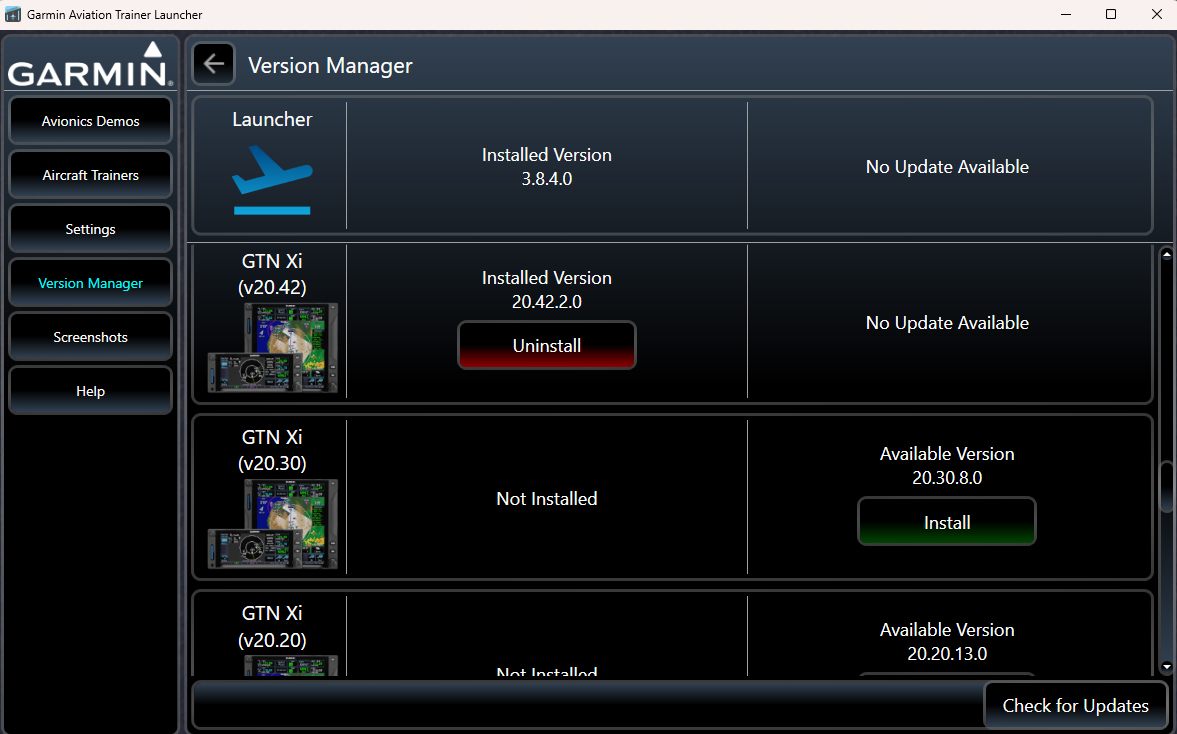
- Inavigate to the Version Manager tab, as shown below, then scroll down until you find GTNXi PC Trainer component V20.42.2 (this is the latest available version)
- Install the GTNXi PC Trainer Component V20.42.2
- Close the Aviation Trainer Launcher, then continue with installing the TDS GTNXi from the TDS GPS Manager